Month: October 2024

  • TOOLS OF THE TRADE PT. 2 10-28-2024

    The sheer number of tools drives lateral thinking. The focus remains on experimentation and trial and error, for now.

    The previous post focused on the visual tools I plan on using to drive my project, implementing Stream Diffusion and AutoLume live within TouchDesigner. This post will focus on the audio tools I will also connect to TouchDesigner.

    Starting off, one of the primary tools for AI audio generation I'll be using is Max 8 by Cycling 74. This tool is somewhat similar to TouchDesigner in implementation and presentation, being a node-based visual programming tool, geared towards audio as opposed to video.
    After becoming familiar with the program, I did some research on AI audio tools that I could either use within the program, or otherwise.

    The first tool I experimented with is DDSP by magenta. I attempted to run this locally in VSCode, and eventually decided to move on from local audio generation as a whole. I got as far as successfully installing the dependencies and successfully getting it set up in a virtual environment. The problem with running these tools locally is that they run on older versions of python, so it is a hassle setting up a venv with conda and making sure the dependencies all run correctly on that version of python.

    Finally when I moved onto Max 8, I started with trying to implement RAVE, using the nn~ package by ICRAM. Similar problems ensued through trying to install the package correctly and actually getting it to work within Max 8, so I went back to the drawing board and did some more research.

    Eventually I came across Taylor Brook and his work in AI audio in Max 8. The two tools he developed will likely contribute greatly in my final project, one more so than the other.

    TENSED COMPUTER IMPROVISOR

    The first an more important of these two programs is the Tensed Computer Improvisor, or TCI for short. This is an interface designed in Max 8 that makes use of machine to improvise audio generation based on user input. It is affected by the input of sounds, and can be trained on audio files or by recording yourself.
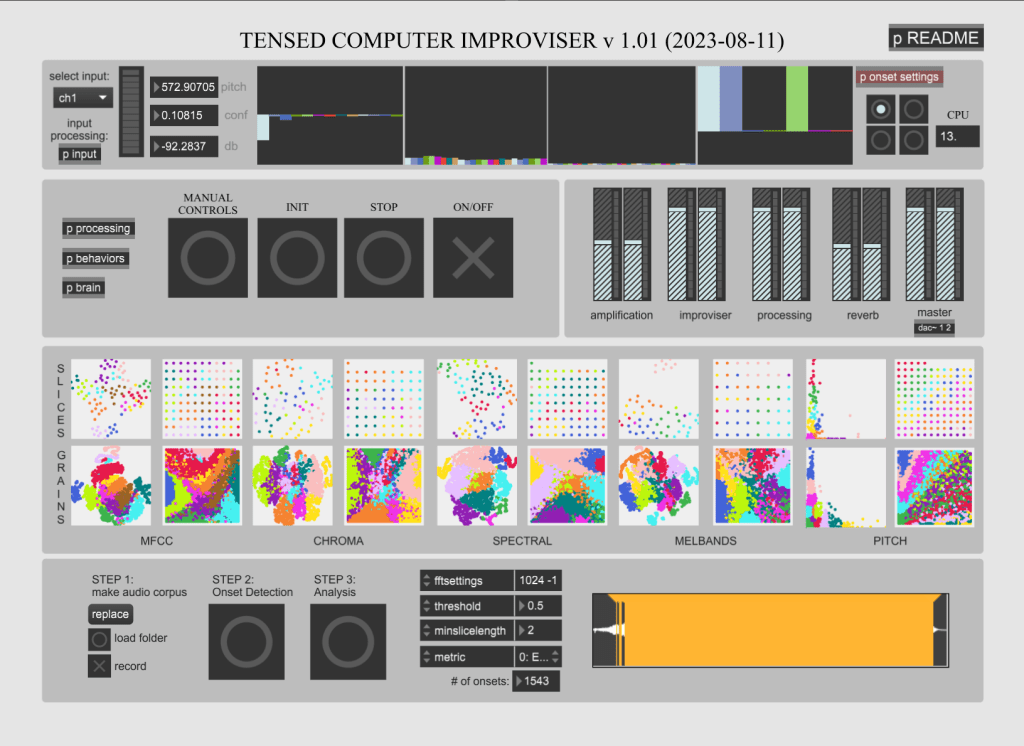
    Allowing for continuous behaviors upon re-coding of audio, my current hope is to gather ambient audio of all different types and using the load folder function in the bottom to get some unique sounds from a large dataset. Additionally, as I have mentioned before, it is possible to connect the audio to Midi, and OSC to influence visuals in TouchDesigner, or to influence the behavior of the audio in Max 8.

    The program is CPU intensive, and I have made adjustments to my PC accordingly, and it runs stably at about 10-17% of CPU utilization.

    SCUFFED COMPUTER IMPROVISOR

    The next tool Brooks developed within Max is called the Scuffed Computer Improvisor, or SCI. This tool is somewhat less developed than the TCI, and is still in early beta. As such it is prone to crashing and CPU issues, but I've mitigated it the best I can through system settings.
    What differentiates SCI from TCI is the improvisor training options in the upper right-hand side of the interface. Compared to TCI, the behavior training is more streamlined and autonomous, allowing for training from sound files or live audio. The improvisor behavior options also allow for some productive generation based on training, as opposed to being reactive to an input. Again, this is exciting to me for my project goals as far as a feedback loop to pure AI audio and visual experiences. Additionally, SCI has OSC and UDP outputs already built in, while I have to manually do it in TCI. This is not a big deal as OSC connection is pretty easy to implement in most of today's programs, but it's a nice added touch.

    Finally, just as a simple proof of concept, I connected the TCI master output to a UDP out object, which I then picked up in TouchDesigner with an OSC In CHOP.
    The audio being played is derived from a house song called "Lose My Mind". Since it's pretty jumbled around, and the training is from just the one audio file, it doesn't sound "good". With a much more extensive and curated dataset, the audio can end up sounding varied and pleasant, elevated by potential visuals and controls.

    ABLETON LIVE

    Finally, we have Ableton Live, a very popular DAW. Ableton is lauded for its extensive features and multi-connectivity options (again with OSC and MIDI). There is also integrated connectivity with TouchDesigner, through TDLive, which makes connection between sets and visuals very streamlined.
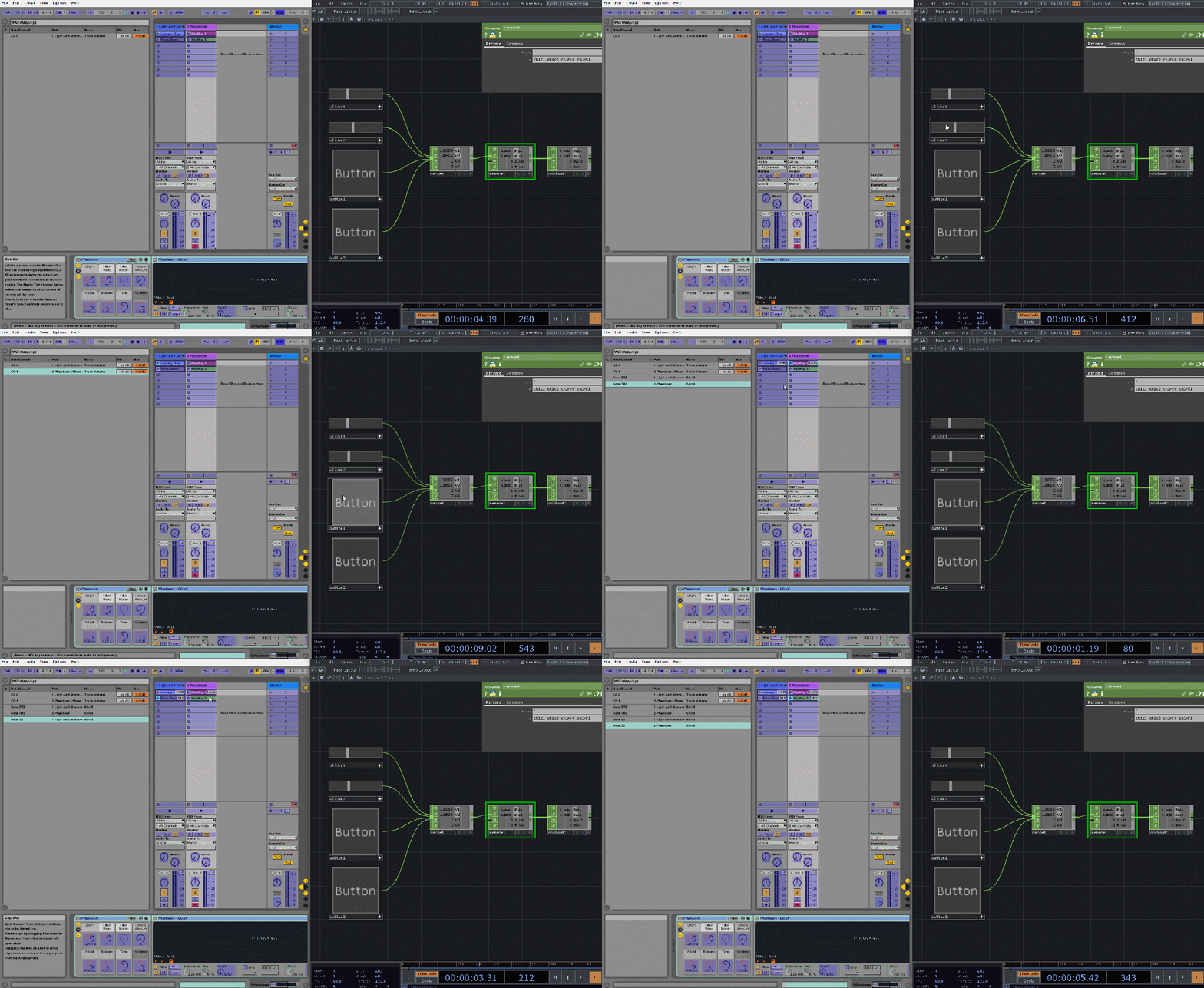
    I have not installed or played around with Ableton much, but in doing my research for the other audio tools I have found that models such as Magenta, DDSP, and RAVE all have supported plugins for AI audio within Ableton, although I am able to completely gauge how live continuous audio could be generated in such a setting. I will eventually get into it with a trial version, and see if the goals of my project necessitates purchasing the software. If I determine so, Ableton and these plugins will most likely earn a part 3 in the Tools of the Trade posts.

    -Ryan
  • TOOLS OF THE TRADE PT. 1 10-18-2024

    Tools are extensions of the hand which are extensions of the mind. Tools permeate throughout mankind. People make tools, and people make with tools.

    In the second pillar of the un\prompted manifesto, I made the distinction that AI is a tool, because that's what it really is. Separating emotions or preconceptions from your judgement, tools are made to make the creative process more efficient. In a mere 5 years AI could possibly be one of the most abundant tools used on the planet.

    Also like most tools, it can be used for good or bad. Not to preach on ethics here, as AI has its fair share of concerns, but like it or not it's here to stay. I think as creators use it more and more the perception of it will change, just like any other novel tool that's come out in the past (For example: The printing press, cameras, Photoshop).

    The purpose of this post is to showcase some of the AI tools I'll be using in my thesis project. I talked a bit about the non-AI tools in my first post, being TouchDesigner, Cables.gl, and Ableton, and I briefly mentioned the AI tools there, but I'll go into more detail now.

    //STREAM DIFFUSION

    Stream Diffusion was made by researchers from ARXIV, and is built upon Stable Diffusion. It was built on the predication of existing models needing an input to generate text or images, but falling short when it comes to real-time generation. While you do still technically need inputs to get something out of it (if it didn't, it would literally be world changing technology), it makes a nice illusion of real-time that can be easily controlled when combined with tools like TouchDesinger.
    In the example the researchers provided, you can see image-image and text prompts  combining to make the generated images. The real technological breakthrough is that it provides these real-time generations at up to 91 frames per second, while reducing GPU consumption by almost half (on certain consumer grade products). This is done through a bunch of tech and AI methods such as stream batching, pre-computation, and model acceleration. 

    Leveraging this for TouchDesigner, dotsimulate has made a plugin TOX that provides a simplified pipeline for achieving this in TD. Combining this with what is already possible in TouchDesigner becomes relatively simple from this point, and is an excellent foundation for experimenting with alternative modes of interaction with the model. I'm thinking motion tracking, midi mapping, audio reactivity, and so on and so on. Unfortunately, in TouchDesigner it runs at a stable 16 frames per second, which is a far cry from the touted 91, but the technology is accelerating very fast, so we'll see what becomes realistically possible.
    In the above example, I have two prompts going into the model that I am changing the weights on in real-time. The output is further influenced by a noise TOP, which I further influence in real time, and already have translating each second on the Z-axis.

    //AUTOLUME

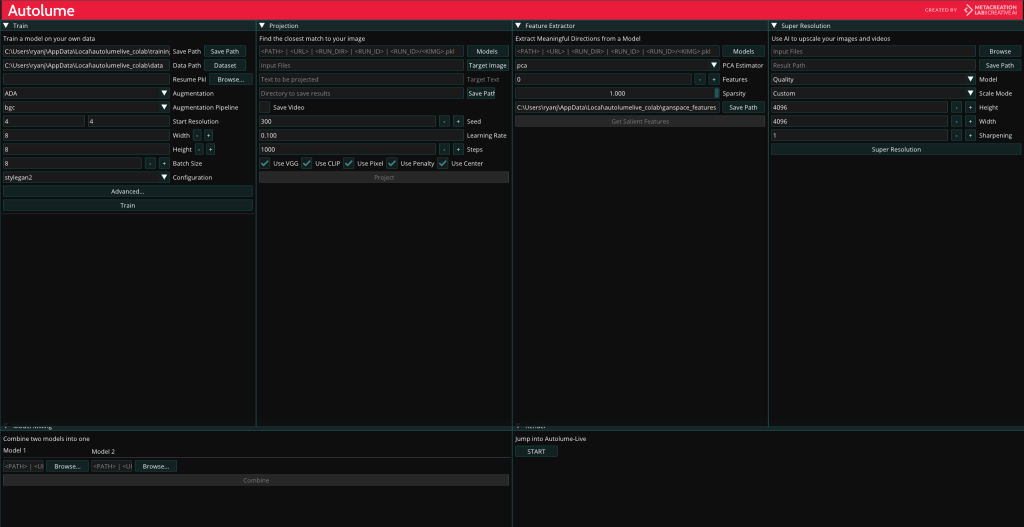
    The next tool I'll make use of is AutoLume, created by researchers from MetaCreation at Simon Fraser University. AutoLume is a very unique tool, in that it's a two for one no-coding software for AI model and art creation. On one end you have the regular AutoLume software, which like I said, allows you to train your own model in a semi-streamlined no-code environment out of any dataset, and can output text or images. What's interesting and unique to the program is that you can trade two models at once, and subsequently combine them to make something wholly unique.
    The base UI is admittedly complex and un-intuitive, and requires a fair bit of reading to get the hang of, but the no-coding system is efficient and unique among similar products. You can upload a dataset of your choosing (or your create one of your own).

    The second leg of AutoLume's features is AutoLume Live, which you can jump into at the bottom right of the main AutoLume UI. Here is where you can put your models to action, achieving a live and continuous display of the model(s) you made.
    The UI, while still complex, is more reminiscent of VJ software such as Resolume, allowing the user to set loops or keyframes, change the speed or intensity of the animation, among other things.

    Something that more tech-savy readers might notice is that near the bottom of the control panel is that it outputs the visuals and parameters as OSC data. This allows for semi-streamlined integration with software such as TouchDesigner, opening the possibilities up extensively for increased modes of interaction, be it motion detection, midi mapping, and more. Aside from that, hosting the visuals within TouchDesigner also allows for experimentation with AI audio generation, and potential feedback loops between generated audio and generated visuals. One affecting the other, and vice versa.

    I'll leave it at that for this post. As far as the AI audio tools go, I'm looking at integrations between Magenta Studio, Suno, and OpenAI's Jukebox, all to be integrated with Ableton and TouchDesigner, but I'll need to do more research in that area. The goal is to get continuous audio generation that can be controlled with a midi or other modes of activation. Look for another post in the near future that goes over these tools and the ways I plan on applying them for my thesis.

    -Ryan
  • BUILD UPON A FOUNDATION 10-09-2024

    Building something from the ground up can be daunting, but a good foundation is essential in keeping it all together.

    People learn different things in all sorts of different ways. Some by studying vigorously for long periods of time, others by getting their hands dirty and diving head first into the thick of it.

    I think I fall more-so under the latter, but I think that different areas afford more learning opportunities from one or the other. Again, I think this is very true for coding and design. You can learn a lot from studying syntax and learning UI's, but you'll never get anywhere if you don't sit down and do something with what you learned.

    As the blog and my thesis go on, I'll start posting weekly, but for now I'm in a fervor, wanting to add to this as much as I want to add to my expertise in the tools I am working with.

    TouchDesigner peaked my interest as a creative tool way back in the pandemic days, and slowly but surely I've been building my knowledge base in the program. Thankfully, I've had more than personal projects to work on with it, so as far as practical use I can add a couple notches to the belt.

    Something I'll likely end up doing for my thesis is creating a UI within the tool, and my contemporaries have done similar things, such as Bileam Tschepe's algorhythm tool, which essentially recreates Resolume within TD. However, the tools to create that within TouchDesigner I'm not wholly familiar with, so this was a nice experimentation into that realm.
    This visualizer is made up of 7 compositions in TouchDesigner, with each one having various levels of stacks to it.

    For those who don't know, TouchDesigner has 4 main levels of node: TOPs (2D Visual), CHOPs (Data), SOPs (3D Visual), and DATs (Code and Text Editing). Combining these is nothing new to me, but the container interface is, which is from a sub-level COMP node.

    Putting these together was surprisingly intuitive, with some preset options on how you want to display the visuals within one another.
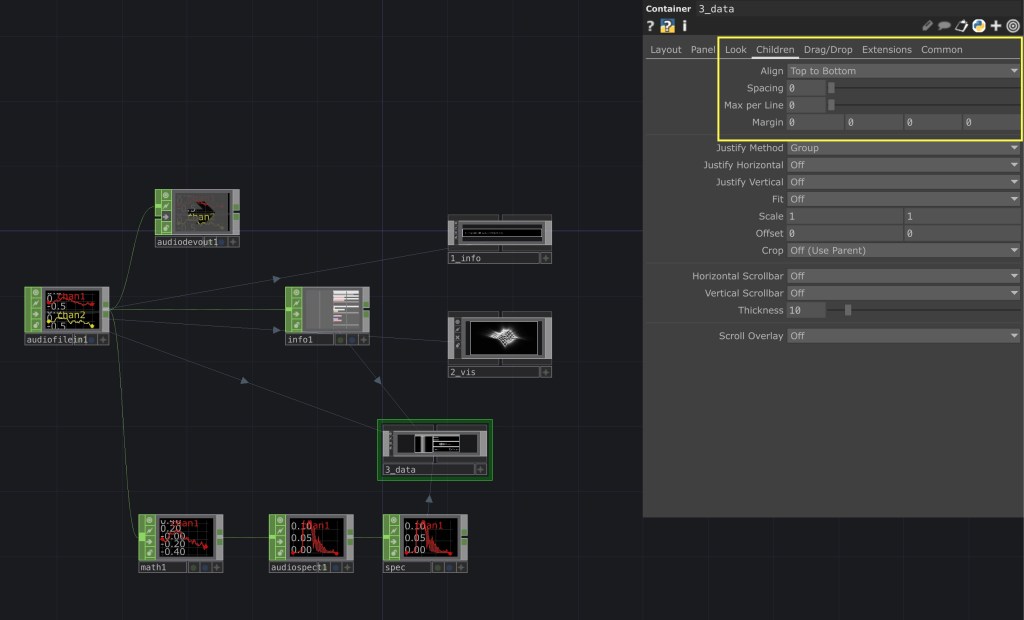
    As you can see in this screenshot, the composition has alignment options to evenly distribute the child containers within it. The hard part comes from making sure that the children containers have the correct dimensions, which can be easily done with some quick expressions.
    I'll wrap up this post here as to not get extremely technical since this doesn't exactly relate to my thesis other than some extra practice. One last thing I'll showcase is the building blocks the interface is laid upon: just the audio file and a couple of CHOPs to get what we want out of the song data.
    You can see on the right the containers that make up the visualizer, with the "3_data" container having 5 nested inside it. All the connecting lines show a reference of some sort to this original network.

    Things are going to get complicated fast, but if this quick run through taught or reinforced anything to me, it was that the foundation is already there, it always was, its up to you how you want to put it together.

    -Ryan
  • PEN TO PAPER 10-08-2024

    Sometimes the hardest part of a creative journey is the beginning.

    Getting the pen to paper can be a daunting task, no matter what venture it is. Even with my thesis, the ideas have been swirling around for a long time, and of course doubt finds ways to creep in no matter what. "Is it a good idea?" "Does it meet any scholarly requirements?" "Could I even successfully execute something like this?"

    The answer to all these questions is yes, and then eventually even more questions. Sometimes you don't even need an answer. There are of course many ways to help mitigate doubt in the creative process. Reading others experiences, writing down any thoughts good or bad, rubber-ducking with a mentor, or an actual rubber duck.

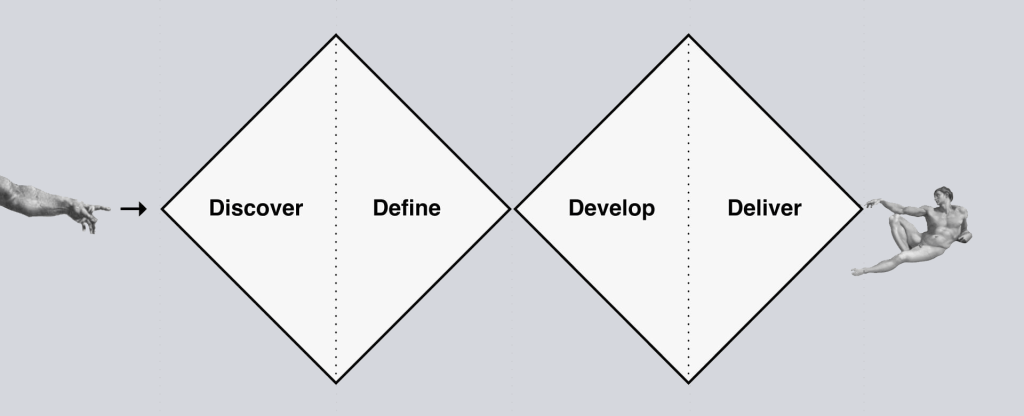
    Personally, I like to temper my expectations, but leave room for wild ideas and practicing the dark arts. It's a fine line between a "go with the flow" and "shoot for the moon" mentality versus being realistic about personal ability, time management, and hardware/technological limitations. My mentor and major professor for my thesis introduced me to the double diamond methodology of practice. The funnel starts wide, exploring any possibilities, eventually closing in until you find a unifying point that brings it all together. Then the funnel opens up again, going from that point into more possibilities, until it closes yet again as a complete work.
    In terms of actually starting my thesis, I've already done a couple things set-up wise before making this website. I started with downloading StreamDiffusion and TouchDiffusion, TouchDesigner widgets that integrate Stable Diffusion (I already have had TD for a while), AutoLume, an AI model research tool with live visual functionality, and Cables.GL, another node-based coding tool that functions similarly to TouchDesigner, but offers increased web functionality.
    Of course, I have used TouchDesigner frequently in the past for performance and web visuals with and for some artists, you can find some examples of this work on my portfolio.

    In terms of my thesis, I will be using these tools to explore the role these AI tools can have in live performance and installation settings, paying particular attention to different areas of interaction between a human and an AI model. As AI is still in its infancy, there may be even more tools that come up in the next year or two that can help or add to this project, which I am extremely excited to see what people make.

    If you're reading this, I want to extend my thanks for taking the time to check in on my progress. Hopefully you'll stick around for what will come in the future!

    -Ryan

//about

Ryan Schlesinger is a multidisciplinary designer, artist, and researcher.

His skills and experience include, but are not limited to: graphic design, human-computer interaction, creative direction, motion design, videography, video-jockeying, UI/UX, branding, and marketing, DJ-ing and sound design.

This blog serves as a means of documenting his master’s thesis to the world. The thesis is an exploration of AI tools in the space of live performance and installation settings.