Building something from the ground up can be daunting, but a good foundation is essential in keeping it all together.

People learn different things in all sorts of different ways. Some by studying vigorously for long periods of time, others by getting their hands dirty and diving head first into the thick of it.

I think I fall more-so under the latter, but I think that different areas afford more learning opportunities from one or the other. Again, I think this is very true for coding and design. You can learn a lot from studying syntax and learning UI's, but you'll never get anywhere if you don't sit down and do something with what you learned.

As the blog and my thesis go on, I'll start posting weekly, but for now I'm in a fervor, wanting to add to this as much as I want to add to my expertise in the tools I am working with.

TouchDesigner peaked my interest as a creative tool way back in the pandemic days, and slowly but surely I've been building my knowledge base in the program. Thankfully, I've had more than personal projects to work on with it, so as far as practical use I can add a couple notches to the belt.

Something I'll likely end up doing for my thesis is creating a UI within the tool, and my contemporaries have done similar things, such as Bileam Tschepe's algorhythm tool, which essentially recreates Resolume within TD. However, the tools to create that within TouchDesigner I'm not wholly familiar with, so this was a nice experimentation into that realm.
This visualizer is made up of 7 compositions in TouchDesigner, with each one having various levels of stacks to it.

For those who don't know, TouchDesigner has 4 main levels of node: TOPs (2D Visual), CHOPs (Data), SOPs (3D Visual), and DATs (Code and Text Editing). Combining these is nothing new to me, but the container interface is, which is from a sub-level COMP node.

Putting these together was surprisingly intuitive, with some preset options on how you want to display the visuals within one another.
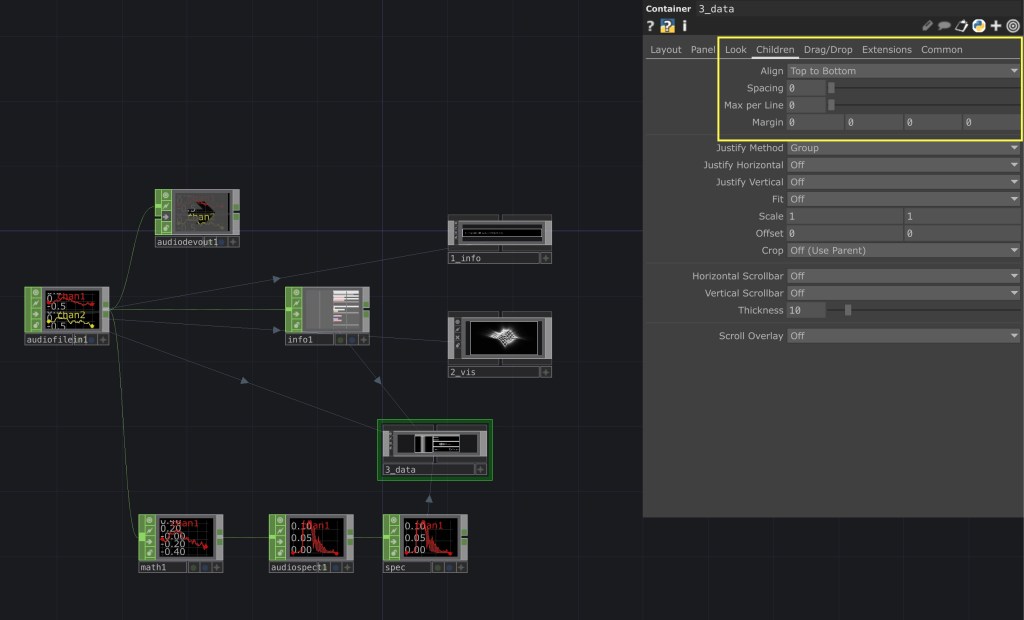
As you can see in this screenshot, the composition has alignment options to evenly distribute the child containers within it. The hard part comes from making sure that the children containers have the correct dimensions, which can be easily done with some quick expressions.
I'll wrap up this post here as to not get extremely technical since this doesn't exactly relate to my thesis other than some extra practice. One last thing I'll showcase is the building blocks the interface is laid upon: just the audio file and a couple of CHOPs to get what we want out of the song data.
You can see on the right the containers that make up the visualizer, with the "3_data" container having 5 nested inside it. All the connecting lines show a reference of some sort to this original network.
Things are going to get complicated fast, but if this quick run through taught or reinforced anything to me, it was that the foundation is already there, it always was, its up to you how you want to put it together.
Ryan Schlesinger is a multidisciplinary designer, artist, and researcher.
His skills and experience include, but are not limited to: graphic design, human-computer interaction, creative direction, motion design, videography, video-jockeying, UI/UX, branding, and marketing, DJ-ing and sound design.
This blog serves as a means of documenting his master’s thesis to the world. The thesis is an exploration of AI tools in the space of live performance and installation settings.


 un-prompted
Leave a comment