Tools are extensions of the hand which are extensions of the mind. Tools permeate throughout mankind. People make tools, and people make with tools.

In the second pillar of the un\prompted manifesto, I made the distinction that AI is a tool, because that's what it really is. Separating emotions or preconceptions from your judgement, tools are made to make the creative process more efficient. In a mere 5 years AI could possibly be one of the most abundant tools used on the planet.

Also like most tools, it can be used for good or bad. Not to preach on ethics here, as AI has its fair share of concerns, but like it or not it's here to stay. I think as creators use it more and more the perception of it will change, just like any other novel tool that's come out in the past (For example: The printing press, cameras, Photoshop).

The purpose of this post is to showcase some of the AI tools I'll be using in my thesis project. I talked a bit about the non-AI tools in my first post, being TouchDesigner, Cables.gl, and Ableton, and I briefly mentioned the AI tools there, but I'll go into more detail now.
//STREAM DIFFUSION
Stream Diffusion was made by researchers from ARXIV, and is built upon Stable Diffusion. It was built on the predication of existing models needing an input to generate text or images, but falling short when it comes to real-time generation. While you do still technically need inputs to get something out of it (if it didn't, it would literally be world changing technology), it makes a nice illusion of real-time that can be easily controlled when combined with tools like TouchDesinger.

In the example the researchers provided, you can see image-image and text prompts  combining to make the generated images. The real technological breakthrough is that it provides these real-time generations at up to 91 frames per second, while reducing GPU consumption by almost half (on certain consumer grade products). This is done through a bunch of tech and AI methods such as stream batching, pre-computation, and model acceleration.

Leveraging this for TouchDesigner, dotsimulate has made a plugin TOX that provides a simplified pipeline for achieving this in TD. Combining this with what is already possible in TouchDesigner becomes relatively simple from this point, and is an excellent foundation for experimenting with alternative modes of interaction with the model. I'm thinking motion tracking, midi mapping, audio reactivity, and so on and so on. Unfortunately, in TouchDesigner it runs at a stable 16 frames per second, which is a far cry from the touted 91, but the technology is accelerating very fast, so we'll see what becomes realistically possible.
In the above example, I have two prompts going into the model that I am changing the weights on in real-time. The output is further influenced by a noise TOP, which I further influence in real time, and already have translating each second on the Z-axis.
//AUTOLUME
The next tool I'll make use of is AutoLume, created by researchers from MetaCreation at Simon Fraser University. AutoLume is a very unique tool, in that it's a two for one no-coding software for AI model and art creation. On one end you have the regular AutoLume software, which like I said, allows you to train your own model in a semi-streamlined no-code environment out of any dataset, and can output text or images. What's interesting and unique to the program is that you can trade two models at once, and subsequently combine them to make something wholly unique.
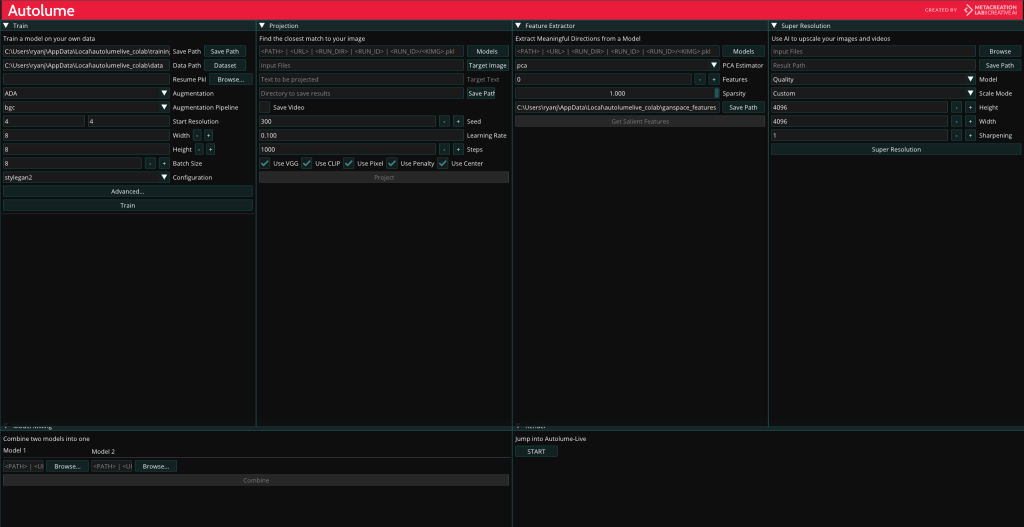
The base UI is admittedly complex and un-intuitive, and requires a fair bit of reading to get the hang of, but the no-coding system is efficient and unique among similar products. You can upload a dataset of your choosing (or your create one of your own).

The second leg of AutoLume's features is AutoLume Live, which you can jump into at the bottom right of the main AutoLume UI. Here is where you can put your models to action, achieving a live and continuous display of the model(s) you made.
The UI, while still complex, is more reminiscent of VJ software such as Resolume, allowing the user to set loops or keyframes, change the speed or intensity of the animation, among other things.

Something that more tech-savy readers might notice is that near the bottom of the control panel is that it outputs the visuals and parameters as OSC data. This allows for semi-streamlined integration with software such as TouchDesigner, opening the possibilities up extensively for increased modes of interaction, be it motion detection, midi mapping, and more. Aside from that, hosting the visuals within TouchDesigner also allows for experimentation with AI audio generation, and potential feedback loops between generated audio and generated visuals. One affecting the other, and vice versa.

I'll leave it at that for this post. As far as the AI audio tools go, I'm looking at integrations between Magenta Studio, Suno, and OpenAI's Jukebox, all to be integrated with Ableton and TouchDesigner, but I'll need to do more research in that area. The goal is to get continuous audio generation that can be controlled with a midi or other modes of activation. Look for another post in the near future that goes over these tools and the ways I plan on applying them for my thesis.

-Ryan

 un-prompted
Leave a comment